INSIDE SIGNAFLOW
Your paper workflow.
From start to finish.
Explore the screens and functions behind SignaFlow: from a first capture to a useful PDF, an organized library and a second copy.
MORE THAN A SCANNER
See what you can do
with a better copy.
Text you can review. PDF tools in one place. Optional backups. Planned visual signing.
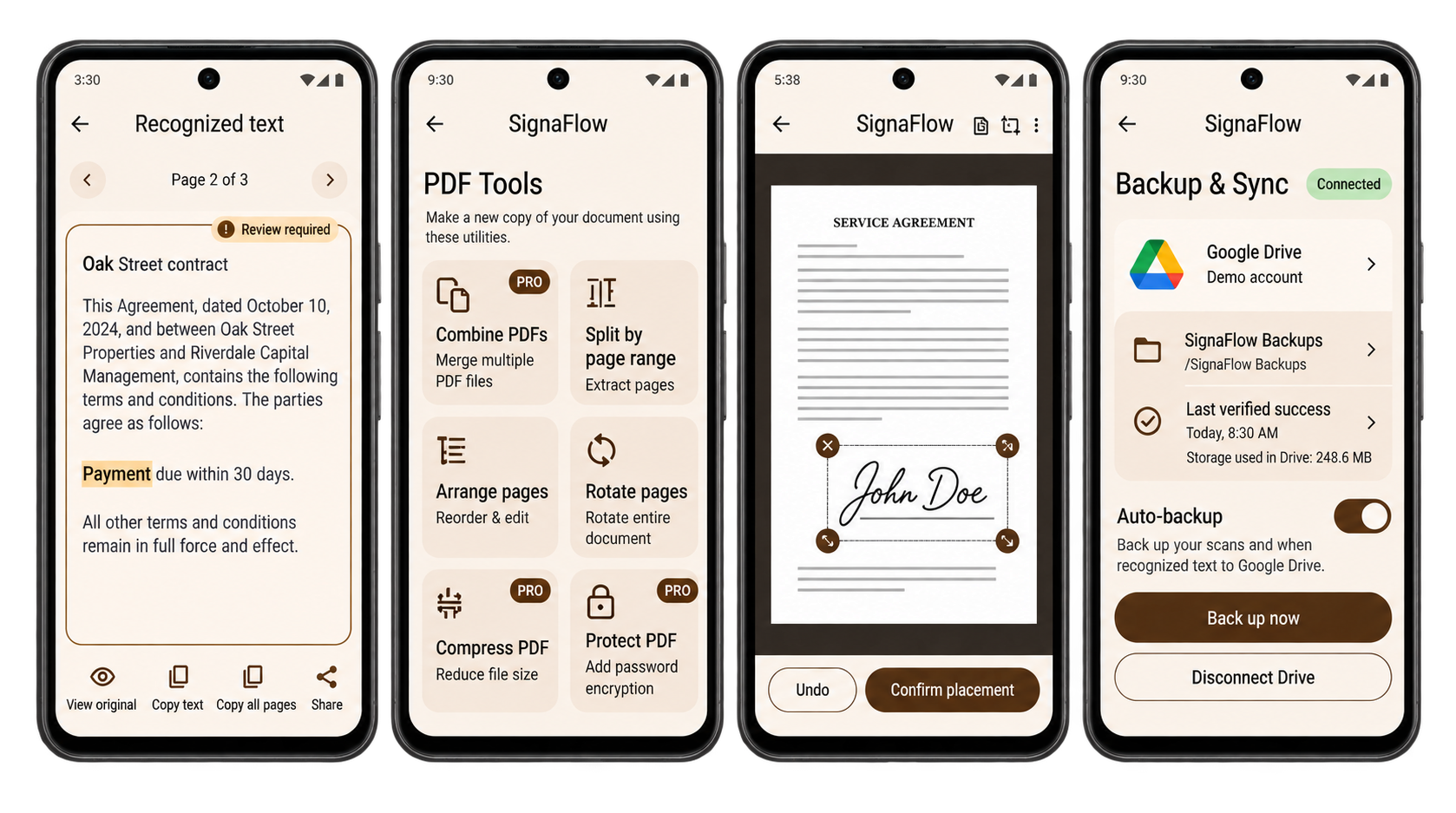
App design previews based on the SignaFlow boards. Sample content. Final release screens may differ.
THE COMPLETE WORKFLOW
Every feature.
In one place.
Explore the functions represented in your SignaFlow workflow. The app is preparing for release; signing and paid-access features are marked planned.
83 functions across 10 categories
Scan & import
Bring paper, photos and PDFs into one workflow.
- Camera scanningCapture a single page or review a multi-page batch.
- Automatic & manual captureChoose how a page is captured; use flash and alignment grid controls.
- Photo & PDF importSelect existing files with Android’s native photo or file picker.
- Import reviewReview selected photos, their order and unsupported items before continuing.
- Camera permission guidanceUnderstand camera access, retry or import files when access is denied.
- Batch review & retakeInspect captures, add more pages or replace an imperfect photo.
- Interrupted draft recoveryResume a recovered scan draft, export its pages or discard it intentionally.
Crop & clean
Keep the content. Clear away the distractions.
- Automatic edge detectionFind document boundaries and correct the page perspective.
- Manual corner adjustmentDrag crop corners and inspect their alignment.
- Accessible corner controlsAdjust a selected corner in fine or coarse steps.
- Cleanup filtersCompare original, color, black-and-white, clean, white-paper and ink treatments.
- Image adjustmentsAdjust brightness, contrast and exposure before applying edits.
- Original comparisonCompare the source and cleaned page before choosing the output.
- Page rotationRotate left or right and apply the chosen orientation.
- Page arrangementReorder, duplicate or remove draft pages, with confirmation before removal.
- Document detailsChoose a name, page size and searchable-text option; save a draft or create a PDF.
Library & folders
A clear home for every document.
- Local document libraryKeep saved documents and scan drafts on your Android device.
- Folders & movingCreate, rename and remove folders; move selected documents into a folder.
- Folder-safe deletionRemove a folder while keeping its documents in the main library.
- FavoritesKeep frequently used documents within easy reach.
- Search & sortingFind documents by name or recognized text; filter and sort your library.
- Trash & restorationRestore trashed documents to the library or confirm permanent local deletion.
- Storage managementInspect usage for documents, originals, cached data and Trash.
- Cache cleanupClear temporary cached data without deleting saved documents.
OCR & text
Make the words easier to find and use.
- On-device recognitionRecognize supported printed text on your phone, including offline.
- Progress & cancellationSee page-by-page progress; cancel while retaining originals and completed text.
- Review recognized textCheck the result against the source and inspect review-required text.
- Search inside a documentHighlight matching words and navigate the results across pages.
- Copy & share textSelect text, copy a page or all recognized pages, and share the result.
- Partial-result recoveryReview completed pages and retry pages that failed or were unreadable.
- No-text alternativesAdjust the crop, retake the page or save without searchable text.
- Searchable PDFsCreate a PDF with a recognized-text layer when OCR succeeds.
PDF reading & tools
Useful edits. A separate output copy.
- PDF viewerRead pages with zoom, thumbnails and page navigation.
- Protected-file openingEnter a password to open a protected PDF; retry incorrect passwords.
- Unsupported-file recoveryImport another file or hand off to another app when a PDF cannot be opened.
- Combine PDFsSelect multiple PDF files, set their order and name the combined copy.
- Split by page rangeExtract the pages you need with validated page-range input.
- Arrange imported pagesReorder, duplicate, rotate or remove pages and save a new copy.
- Rotate PDF pagesApply rotation to all pages or a selected range.
- Compress a copyChoose a compression target for smaller sharing or print-oriented output.
- Password-protect a copySet and confirm a password for an encrypted PDF output.
- Processing & cancelFollow processing progress and cancel without changing the source.
Signatures & stamps
Planned: add the finishing details to a PDF copy.
- Draw a signatureDraw, undo, erase or clear the signature before saving it.
- Saved signaturesName and manage saved signatures and initials on your device.
- Place & resizeSelect a signature, position it on the page and confirm placement.
- Date stampsChoose a date format and placement.
- Text stampsAdd custom text, select a style and adjust the font size.
- Stamp appearanceChoose a color and undo placement changes.
- Original preservationCreate a signed or stamped output copy while preserving the original.
- Digital-signature warningWarn before editing a PDF that already contains a certificate-based signature.
Export, share & print
Send the right copy to the right place.
- PDF creation & reviewCreate a PDF, inspect its page count and open the finished file.
- Native sharingHand a PDF to Android’s share sheet and your chosen receiving app.
- Save to FilesChoose the destination and filename through Android’s save-file picker.
- Page image exportSave an individual page as JPG or PNG.
- Print preparationChoose all pages or a custom range, paper size, orientation and color.
- Android printingContinue to the system print interface and an installed print service.
- Export recoveryRetry an interrupted save or choose a different destination.
- Low-storage guidanceReview available space, manage device storage and return safely to the draft.
Backup & restore
Optional copies in your Drive or your files.
- Your Google DriveConnect your own Google account with access limited to app-used Drive files.
- Local backup filesSave a local backup and restore it through the native file picker.
- Manual Drive backupUpload and verify a versioned backup without overwriting the previous snapshot.
- Automatic backup preferencesOpt into scheduled backups, Wi-Fi and charging preferences, and Trash inclusion.
- Progress & recoverySee upload progress, cancel safely and recover from temporary interruptions.
- Snapshot historyReview available backups, their document counts and restore options.
- Validation before restoreCheck a backup’s compatibility and integrity before adding files.
- Additive restorationRestore as separate copies; review results without overwriting existing work.
- Duplicate preventionDetect an already-restored snapshot instead of adding it repeatedly.
- Account & connection controlsChange or disconnect the backup account; reconnect when authorization expires.
- Offline & full-Drive recoveryKeep local originals safe while a backup waits for a connection or storage.
- Snapshot deletionConfirm before deleting a cloud backup; local files and Trash remain separate.
Plans & reminders
Planned: clear choices through Google Play.
- Free allowanceFive successfully saved new pages per calendar month; existing files stay accessible.
- Pro choicesPlanned annual $59.99, monthly $7.99 and lifetime $129.99 offers in US dollars.
- Annual trialA planned eligible 7-day trial with payment and renewal details shown before purchase.
- Manage & restore purchasesManage subscriptions and check eligible paid access through the Play billing account.
- Purchase status & recoveryExplain pending, canceled-but-active, expired and temporarily offline access.
- Trial remindersOptional local reminders three days and one day before the trial ends.
Defaults, help & privacy
The controls around the everyday workflow.
- First-use introductionLearn the capture, cleanup and search workflow, then choose free access or a planned Pro offer.
- Scan defaultsSet the default filter, page size, OCR, original-image and flash preferences.
- Notification preferencesChoose trial reminders and backup alerts; open Android notification settings.
- Frequently asked questionsFind help for scanning, plans, offline use and document backups.
- Human email supportPrepare a support email and review information before sending.
- Optional diagnosticsInspect diagnostic details before copying or attaching them to a support request.
- Privacy, terms & licensesRead the data-handling details, purchase terms, licenses and app information.
No matching features. Try another word or choose All features.
This catalogue describes the pre-release product workflow. Final availability and Pro access will be confirmed in the released app. App previews use fictional sample documents.
LESS PAPER. MORE POSSIBILITY.
Make room for
what matters.
SignaFlow is getting ready for Android.
Have a question before launch?